What You'll Learn
Every device you own, a phone, a router, a washing machine with a digital display, is built from three distinct layers that get confused constantly: hardware, software, and firmware. This tutorial gives each one a precise definition, shows how they depend on each other, and works through five real devices to make the distinction concrete instead of abstract. It's part of our Computer Architecture series.
On This Page
- What Is Hardware?
- What Is Software?
- Hardware vs. Software: The Core Difference
- What Is Firmware?
- Examples of Hardware, Software, and Firmware
- Hardware vs. Software vs. Firmware at a Glance
- How the Three Layers Work Together
- Why This Distinction Actually Matters
- Real-World Examples
- Common Mistakes and Misconceptions
- Frequently Asked Questions
- References
What Is Hardware?
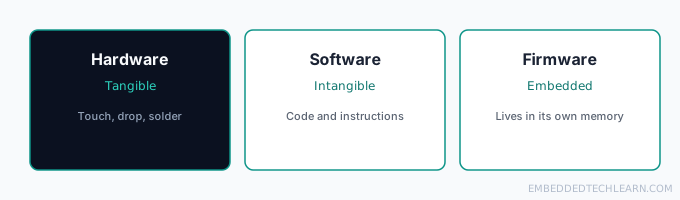
Hardware is every physical, tangible part of a computing system. If you can touch it, drop it, or solder it, it's hardware: the CPU, RAM modules, a motherboard, a touchscreen, a keyboard, the plastic case around all of it. Hardware is defined by having physical mass, it takes raw materials and manufacturing to make more of it.
Take a television remote control apart and everything you find is hardware: the mechanical buttons, the battery supplying current, and the small PCB (printed circuit board) connecting the buttons to an infrared transmitter. None of that circuitry does anything useful on its own, it needs the other two layers to actually control a TV.
Hardware also has real, physical constraints that the other two layers don't: it wears out, it draws power, it generates heat, and making more of it costs real manufacturing money per unit. That's a big part of why so much design effort goes into pushing logic into firmware or software instead of adding more physical components, code is far cheaper to change than a circuit board once a device has already shipped.
What Is Software?
Software is the set of instructions, data, and programs that tell hardware what to do. It's intangible, you can't hold "software" in your hand, only the storage medium it's written to. It exists as compiled code sitting in memory or storage, and it's what turns raw processing power into something a person actually finds useful, like an app, a game, or a menu system.
On a smart TV, software is what interprets a signal from the remote and decides what to actually do with it: which menu to render, which streaming app to launch, how to adjust the volume curve, how to scale the picture for the connected display. The hardware supplies the button-press signal; the software decides what that signal means.
Software is also what makes a device flexible after it's already been manufactured. The same TV hardware can gain entirely new streaming apps, a redesigned menu, or new remote-control gestures purely through a software update, without a single physical component changing. That flexibility is exactly why software gets updated so much more often than firmware or hardware ever could.
Hardware vs. Software: The Core Difference
Reduced to the simplest possible comparison: hardware is the physical device, software is the code that runs on it. Hardware is something you can touch, drop, or wear out through years of use, a CPU, a keyboard, a screen. Software is intangible: a set of instructions stored in memory or on disk that tells that hardware what to do, an operating system, a browser, a game. Neither one does anything useful alone. Hardware with no software just draws power and sits idle, and software has no way to run at all without physical hardware underneath it to actually execute its instructions.
| Hardware | Software | |
|---|---|---|
| What it is | Physical, electronic components | Code, instructions, and data |
| Can you touch it? | Yes | No, only the storage medium it's written to |
| Example | CPU, keyboard, monitor | Operating system, browser, app |
| Changes after purchase? | Rarely, needs a physical swap | Often, through updates and patches |
That two-layer picture covers most everyday devices, but it leaves out one more category that sits in between the two: firmware.
What Is Firmware?
Firmware sits between the other two: it's low-level software that's permanently (or semi-permanently) programmed into a hardware device's own memory, usually flash memory or ROM, rather than living on a general-purpose file system. A computer's BIOS or UEFI is a classic example of firmware. For exactly why firmware has to live in ROM/flash rather than RAM, see RAM vs. ROM: What's the Difference?.
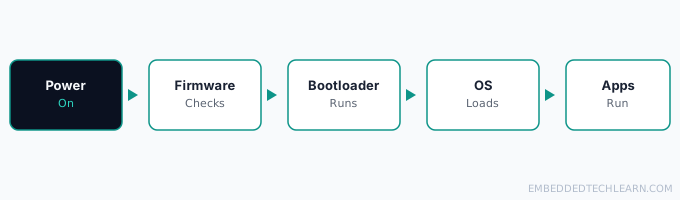
When a smartphone powers on, firmware runs first, before any app, before even the operating system is fully loaded. It checks the battery, initializes the screen and memory, verifies basic hardware health, and then hands off control to a bootloader, which in turn starts the operating system. None of that sequence is visible to the user, but skip any step in it and the phone won't boot at all.
Firmware is also what makes hardware from different manufacturers behave consistently. Two routers with completely different internal chips can expose the same web-based settings page purely because their firmware presents a similar interface on top of very different physical hardware. Firmware is, in a real sense, the layer that gives raw silicon a personality.
Examples of Hardware, Software, and Firmware
Concrete examples make the three categories easiest to tell apart at a glance:
Hardware examples:
- A CPU (the processor itself)
- RAM modules
- A hard drive or SSD
- A keyboard, mouse, or touchscreen
- A motherboard
- A battery
Software examples:
- An operating system, like Windows, macOS, or Android
- A web browser, like Chrome or Firefox
- An app, like Spotify or Photoshop
- A video game
Firmware examples:
- A computer's BIOS or UEFI
- A router's control logic
- A printer's onboard firmware
- A washing machine's cycle-control code
- A digital camera's firmware
Hardware vs. Software vs. Firmware at a Glance
With all three defined, the differences are easiest to see side by side. Notice that firmware sits in the middle of the table on purpose: it shares hardware's trait of being tied to one specific device, but shares software's trait of being code that can, at least in principle, be changed after manufacturing.
| Layer | What it is | Example | Key trait |
|---|---|---|---|
| Hardware | Physical, electronic components | Microcontroller, RAM, touchscreen | Tangible, needs manufacturing |
| Firmware | Low-level code embedded in the hardware's own memory | BIOS/UEFI, router control logic, TV startup code | Semi-permanent, hardware-specific |
| Software | High-level programs and applications | Operating systems, browsers, apps | Intangible, updated frequently |
How the Three Layers Work Together
These three layers form a dependency chain, not three independent choices:
- Hardware provides the physical processing power: a CPU, memory, a battery.
- Firmware wakes that hardware up and loads a bootloader, the minimum logic needed to get the system to a usable state.
- Software then runs on top, as the operating system and the applications a person actually interacts with.
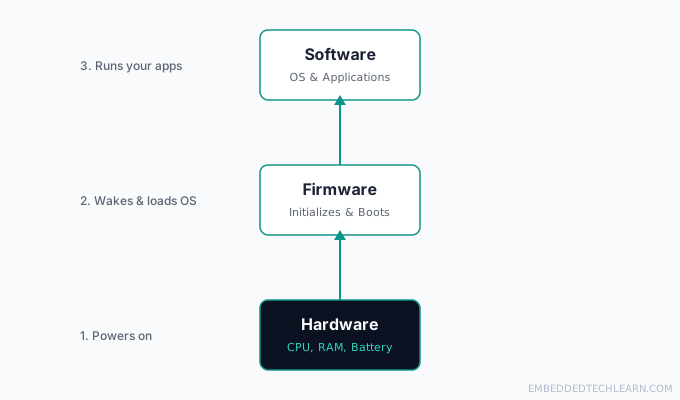
Each layer depends on the one below it: hardware supplies the physical medium, firmware supplies the baseline initialization logic, and software supplies everything a user actually recognizes as "using the device." This is the same CPU/memory/I-O model covered in What Is Computer Architecture?, firmware is essentially the first program that architecture ever runs.
This ordering also explains why problems at each layer look so different to troubleshoot. A hardware failure is usually permanent until a part is physically replaced. A firmware failure can sometimes be recovered by re-flashing, but often requires special tools and carries real risk of bricking the device. A software failure is, by comparison, the easiest to fix: reinstall the app, clear its data, or roll back an update, all without touching anything below it.
Why This Distinction Actually Matters
This isn't just vocabulary. Knowing which layer a problem lives in changes what you should actually do about it. A phone that won't turn on at all points toward hardware or firmware, not a software bug, no app update is going to fix a device that can't even initialize its own screen. A router that behaves inconsistently across a manufacturer's product line, despite similar specs, often comes down to firmware differences, not the underlying chip. And for anyone working in embedded systems specifically, this distinction is the whole job: embedded development largely lives at the firmware layer, writing the exact code that has to correctly initialize and control real, physical hardware with no general-purpose operating system to lean on.
Real-World Examples
Example 1: A Smartphone's Boot Sequence
Power on a phone and firmware runs first: checking the battery, powering the screen, verifying memory. It then hands off to a bootloader, which loads the operating system (software), which finally starts the apps you actually see. Three layers, in strict order, before you ever unlock the screen. If any one of those steps fails, for example a battery reading comes back outside its safe range, the phone will refuse to continue booting rather than risk running full software on hardware it can't verify is safe.
Example 2: A Smart TV Remote
The remote itself is hardware: buttons, battery, an infrared LED. Pressing a button sends a hardware signal to the TV, where software interprets it and decides what happens: change the channel, open a menu, adjust volume. The remote has no idea what "Netflix" is, it just sends a signal; the TV's software supplies the meaning. Swap the remote for a universal one from a different brand and the TV still works the same way, because the meaning lives entirely in the TV's software, not in the remote's hardware.
Example 3: A Router Firmware Update
A home Wi-Fi router runs firmware, not a full general-purpose operating system, to manage its networking logic. When a manufacturer pushes a firmware update, they're replacing that low-level code directly in the router's own memory. If the update fails partway through (power loss, for instance), the router can "brick," it loses its ability to even initialize its own hardware, and needs specialized recovery tools to re-flash it. This is exactly why router manufacturers warn so insistently against unplugging a device mid-update, and why some routers keep two firmware copies so they can fall back to a working one if a new update fails.
Example 4: A Game Console
A modern console cleanly separates all three layers: hardware (the custom chip, storage, controllers), firmware (low-level startup code that initializes the system and loads the console's OS), and software (the console's own OS plus the games themselves). This is also why a console can receive a "system software update" without anyone touching a single physical component, and why the exact same physical console hardware can feel like a very different product after a major software update changes its entire home screen and feature set.
Example 5: A Washing Machine Control Board
A washing machine with a digital display usually has no traditional operating system at all, just a microcontroller running firmware directly. That firmware reads the dial/button inputs (hardware), runs the wash cycle logic, and drives the motor and valves. There's no separate "software layer" here in the app-and-OS sense, firmware is doing the job software would do in a more general-purpose device. This is also a good example of why "firmware update" sounds unusual for a washing machine: most people don't expect an appliance to have updatable code at all, but any washing machine with a digital cycle selector almost certainly does.
Common Mistakes and Misconceptions
- Treating "firmware" and "software" as interchangeable words. Firmware specifically refers to low-level code embedded in a device's own memory; software is the broader, higher-level category.
- Assuming every device runs a full operating system. Many embedded devices (like the washing machine example above) only ever run firmware, there's no separate OS layer at all.
- Assuming hardware can do anything useful with zero code. Even the simplest processor needs some form of instructions, even if that "software" is just a few kilobytes of firmware, to do anything at all.
- Assuming firmware updates are as safe and frequent as app updates. A failed firmware update can leave a device unable to start at all ("bricking"), which is why firmware updates are shipped far more conservatively than typical app updates.
- Blaming "software" for a problem that's actually firmware. Since users only ever interact with the software layer directly, it's the default scapegoat, even when the real fault is a firmware bug the software has no way to work around.
- Assuming a device's hardware determines its entire feature set forever. Plenty of "new" features on existing hardware are really just new firmware or software, the physical device may not have changed at all.
Frequently Asked Questions
What is the difference between hardware and software?
Hardware is the physical device itself, anything you can touch, drop, or watch wear out over time. Software is the set of instructions that runs on that hardware: intangible code stored in memory or on disk that tells the hardware what to do. Neither is useful without the other, hardware with no software just draws power, and software can't run at all without physical hardware to execute it.
What are some examples of hardware and software?
Common hardware examples include the CPU, RAM, a keyboard, and a monitor, physical components you can actually hold. Common software examples include the operating system, a web browser, and any app or game installed on the device, code that runs on that hardware but has no physical form of its own. See the Examples section above for firmware examples too.
What happens if a device's firmware gets corrupted?
The hardware can fail to initialize at all, a state commonly called "bricking." Recovering usually requires specialized tools to re-flash the device's ROM with working firmware, sometimes only possible at the manufacturer's service center.
Can hardware work without any software or firmware at all?
No. Even the simplest processor needs instructions, in the form of machine code, to do anything. A CPU with no code loaded into it just sits idle.
Why are firmware updates less frequent than software updates?
Firmware controls baseline hardware functionality, so a bad firmware update carries a much higher risk (including bricking the device) than a bad app update. Manufacturers typically only ship firmware updates for critical security fixes or to support new hardware revisions, not routine feature additions. Software, by contrast, can be patched, rolled back, or reinstalled with far less risk, since it never touches the layer responsible for getting the device to a working state in the first place.
Is firmware just another word for software?
Not quite. Firmware is a specific, low-level subset of software: it's code embedded directly into a hardware device's own memory to control that device at a basic level, rather than a general-purpose application that runs on top of an operating system.
What's the difference between firmware and an operating system?
An operating system is a large, general-purpose piece of software that manages many applications and resources at once. Firmware is smaller, more specialized, and usually exists specifically to initialize hardware and, in many embedded devices, to run the device's entire logic without any separate OS at all.
Can you physically touch software?
No. You can touch the storage medium (a hard drive, an SSD, a memory chip) that software is stored on, but the software itself, the actual instructions, is intangible.
Is a computer's BIOS hardware or firmware?
Firmware. The BIOS (or its modern replacement, UEFI) is low-level code stored in a chip on the motherboard, and it's the first code that runs when a computer powers on, before the operating system loads.
What actually happens when you "flash" new firmware onto a device?
Flashing overwrites the contents of the device's firmware storage (typically flash memory) with a new firmware image. Unlike installing a regular app, this directly replaces the low-level code the device depends on to start up at all, which is why a failed or interrupted flash is so much riskier than a failed app install.
Do all electronic devices have firmware?
Nearly all devices with a microcontroller or CPU have some form of firmware, even extremely simple ones like a digital thermostat or an electric toothbrush. Firmware is what lets even minimal hardware follow any logic at all. A device would need to be purely analog, with no programmable chip whatsoever, to have no firmware at all, and those are increasingly rare even in simple consumer products.
Why is "bricking" a device such a serious risk during a firmware update?
Because firmware is what the hardware needs just to initialize itself. If the update is interrupted or corrupted, the device can lose the ability to start up at all, unlike a failed software update, which usually just fails to install without damaging the ability to boot.
How does firmware relate to computer architecture as a topic?
Firmware is the practical bridge between architecture and running software: it's the first code that actually executes on the CPU/memory/I-O model covered in What Is Computer Architecture, before any operating system or application gets a chance to run.
Which layer should someone learn first if they want to get into embedded systems?
Hardware and firmware, in that order, matter most for embedded work specifically. A solid grasp of what the hardware actually provides (registers, memory-mapped I/O, interrupts) makes firmware code make sense, since firmware is essentially the layer written specifically to control that hardware. General application software concepts transfer less directly to embedded development than most newcomers expect.
References
- Firmware: overview of firmware and how it differs from general software.
- Computer hardware: overview of physical computing components.
- Software: overview of software as a category.