What You'll Learn
Every computer stores data across several distinct tiers, and two of the most confused terms in that stack are RAM and ROM. Both hold bits. Both sit close to the CPU. But they exist for opposite reasons, and mixing them up leads to real misunderstandings about why a device behaves the way it does when power is removed, or why a "full RAM" warning slows a computer to a crawl. This tutorial defines each one precisely, compares them side by side, and shows exactly where they sit in the bigger memory picture. It's part of our Computer Architecture series, building on What Is Computer Architecture? and The Basic Building Blocks of a Computer.
On This Page
- Memory vs. Storage: The Functional Split
- RAM Explained: The Volatile Workspace
- ROM Explained: The Non-Volatile Repository
- RAM vs. ROM: Side-by-Side Comparison
- Why a Computer Needs Both
- Where RAM and ROM Fit in the Memory Hierarchy
- Why This Matters for Embedded C
- Real-World Examples
- Common Mistakes and Misconceptions
- Frequently Asked Questions
- References
Memory vs. Storage: The Functional Split
"Memory" and "storage" get used interchangeably in casual conversation, but inside a real system they're different layers doing different jobs. Storage (an SSD or HDD) holds data long-term, even with the power off, but it's relatively slow to read from and write to. Memory (RAM) is fast but temporary, it only holds what the CPU is actively working with right now, and loses everything the instant power drops.
ROM complicates this split in a useful way: it behaves like storage in one sense (it survives power loss) but sits physically and functionally much closer to memory, right next to the CPU, holding the small amount of code a system needs before anything else can run. Understanding RAM and ROM properly means understanding this: they aren't two points on the same line, they're built to solve two different problems that happen to both involve "storing bits near the processor."
RAM Explained: The Volatile Workspace
RAM (Random Access Memory) is the high-speed, volatile memory a computer uses to hold data and instructions it's actively working with. "Volatile" is the key word: RAM needs a continuous supply of power to retain anything at all. Cut the power, even for a fraction of a second, and everything stored in RAM disappears.
That trade-off exists on purpose. Because RAM never needs to preserve data through a power cycle, its circuitry can be optimized purely for speed and for supporting both reads and writes constantly, thousands of times per second, without wearing out. This is why RAM is where running programs, open files, and anything the CPU is touching right now actually live, not on the much slower storage drive underneath.
RAM itself splits into two common types. SRAM (static RAM) is faster and more expensive, and it's what CPU cache is built from, in very small quantities, right next to the processor core (see CPU Cache Memory Explained for how the L1/L2/L3 layers actually use it). DRAM (dynamic RAM) is slower and cheaper, and it's what makes up the larger pool of RAM a system uses as its main working memory. Both are volatile; the difference is speed, cost, and how much of each a system can practically afford to include.
The names hint at the underlying circuitry too. SRAM holds a bit in a small loop of transistors that stays stable as long as power flows, no extra effort required. DRAM stores a bit as a tiny electrical charge in a capacitor, which leaks away within milliseconds unless it's actively refreshed, read and rewritten, thousands of times a second. That refresh overhead is exactly why DRAM is slower than SRAM despite being far cheaper per bit, and why a system's main RAM sticks warm up under sustained heavy use in a way registers and cache never do (see The Memory Hierarchy Explained for the transistor-count reason behind that cost difference).
ROM Explained: The Non-Volatile Repository
ROM (Read-Only Memory) is non-volatile: it keeps its contents with absolutely no power supplied at all. That's the entire reason it exists. Some piece of code has to be available the instant a device is powered on, before an operating system, before RAM has anything useful loaded into it, and ROM is built specifically to survive in that gap.
Classic ROM, sometimes called mask ROM, is physically written at the factory and can never be changed afterward, the data is etched directly into the chip's circuitry during manufacturing. Most modern devices actually use EEPROM or flash memory in ROM's traditional role instead, which behaves like ROM (non-volatile, and mostly read rather than written) but can be rewritten a limited number of times. A firmware update or a BIOS flash is exactly this: overwriting the contents of that chip with a new image, not touching RAM at all.
ROM's read/write pattern reflects its job. It's written once (or very rarely, during an update) and then read over and over, every single time the device powers on. That access pattern is completely different from RAM's constant read-and-write churn, and it's part of why ROM can afford to be slower: it isn't in the hot path of a running program the way RAM is.
Flash memory, the technology behind most rewritable ROM today, has a real limit on how many times any given cell can be erased and rewritten before it wears out, often somewhere in the tens of thousands to low millions of cycles depending on the flash type. Firmware designers work around this with wear leveling, spreading writes evenly across the chip instead of hammering the same cells, and by writing to flash far less often than a program ever writes to RAM. This is one more reason boot code and firmware belong in ROM/flash and not RAM: their write pattern (rare, deliberate) is a completely different shape than RAM's (constant, automatic).

RAM vs. ROM: Side-by-Side Comparison
| RAM | ROM | |
|---|---|---|
| Volatility | Volatile, clears at power-off | Non-volatile, retains data with no power |
| Read/write | Read and write constantly | Mostly read-only (rewritable variants exist) |
| Speed | Very fast | Slower |
| Typical contents | Running programs, active data | Firmware, BIOS/UEFI, boot code |
| Typical technology | SRAM (cache), DRAM (main RAM) | Mask ROM, EEPROM, flash |
The two rows that trip people up most are volatility and read/write behavior. Everything else, speed, typical contents, follows naturally once those two are clear: something that has to survive power loss can't also be optimized purely for constant rewriting, and vice versa.
Why a Computer Needs Both
Neither RAM nor ROM alone can do a computer's job. A system built only from RAM would forget everything, including how to boot, the instant power was removed, there'd be no way to even start the process of loading an operating system. A system built only from ROM would be stuck running exactly the code baked in at manufacturing time, unable to run new programs, open new files, or handle data that changes moment to moment.
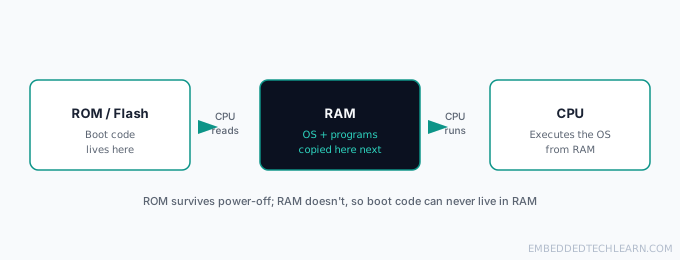
Splitting the job in two solves both problems at once. ROM (or flash acting in its role) holds the small, rarely-changing bootstrap code that has to exist before anything else can run. RAM holds everything else, and specifically everything that changes constantly while the system operates. Neither has to compromise on the trait that matters most for its job: ROM doesn't need write speed, RAM doesn't need to survive a power cut.
Where RAM and ROM Fit in the Memory Hierarchy
What Is Computer Architecture? covers the memory hierarchy primarily by speed and capacity: registers, then cache, then RAM, then storage, each step trading speed for capacity. RAM and ROM cut across that same hierarchy from a different angle, volatility, rather than speed.
Registers, cache, and RAM are all volatile. ROM, flash, SSDs, and HDDs are all non-volatile. A chip can be extremely fast and still non-volatile (some flash variants), or extremely fast and still volatile (registers), the two properties aren't the same axis, they just happen to correlate loosely because non-volatile technologies have historically been harder to make fast.

This distinction also explains the exact sequence a device follows at power-on: the CPU can only ever start by running code from something non-volatile, since nothing volatile has anything in it yet.
Why This Matters for Embedded C
Embedded C code is split across RAM and ROM/flash explicitly, not as an abstraction the operating system hides. A microcontroller's linker script decides, at compile time, which parts of a program go where: compiled instructions and const data typically live in flash (acting as ROM), while variables that change at runtime are placed in RAM. Getting this wrong, say, trying to write to a memory address that's actually mapped to flash, doesn't raise a friendly error the way it might on a desktop, it can silently fail or corrupt data. This is also why const matters so much more in embedded C than it might seem to on a desktop: it's a direct signal to the compiler about which memory type a value belongs in.
Real-World Examples
Example 1: A Phone Losing Charge Mid-Update
If a phone's battery dies while an app is open, whatever unsaved work existed only in RAM is gone the instant power cuts out. But the phone's firmware, stored in flash memory acting as ROM, is untouched, plug the phone back in and it boots exactly as before. This is the clearest everyday demonstration of volatility: RAM forgets, ROM/flash doesn't.
Example 2: Flashing a Router's Firmware
Updating a router's firmware overwrites the contents of its flash memory, the ROM-role chip, directly. The router's RAM is irrelevant to this process; it gets wiped and repopulated on every single reboot anyway, whether or not a firmware update happens. The risk in a firmware update (the router "bricking" if power is lost mid-flash) exists specifically because that non-volatile chip is being rewritten, not because anything is happening to RAM.
Example 3: A Desktop's BIOS/UEFI Chip
A desktop motherboard has a small, dedicated EEPROM chip holding the BIOS or UEFI, entirely separate from the system's main RAM sticks. That chip is what runs the instant the power button is pressed, before the operating system, before the RAM sticks have anything useful loaded into them at all, checking hardware and then handing off to a bootloader.
Example 4: A Microcontroller Reading a Sensor
An 8-bit microcontroller keeps its compiled program in on-chip flash (ROM's role) and stores the sensor reading it just took in SRAM (RAM's role). If the device loses power mid-read, the sensor value in SRAM is lost, but the program itself, still sitting safely in flash, runs again from the exact same starting point the next time power is restored.
Example 5: Editing a Photo on a Laptop
Opening a photo pulls it from the SSD (storage) into RAM, where the editing app can actually manipulate its pixels quickly. Every brush stroke or filter applies to the copy sitting in RAM. Saving the file writes that modified copy back to the SSD; closing without saving means the RAM copy, and every unsaved change in it, simply disappears when the app releases that memory.
Common Mistakes and Misconceptions
- Assuming ROM can never be changed at all. Classic mask ROM can't, but EEPROM and flash, which fill ROM's role in almost every modern device, can be rewritten, just far less often and far more carefully than RAM.
- Calling flash memory "RAM" because it's fast, or "ROM" because it's non-volatile. Flash is genuinely its own thing: non-volatile like ROM, but read/write like RAM.
- Thinking more RAM always equals a faster computer. Extra RAM only helps up to the point where a system stops swapping to storage. Beyond that, it does nothing for speed.
- Confusing "memory" (RAM) with "storage" (SSD/HDD) in casual conversation. A phone advertised with "128GB memory" is actually describing storage capacity, not RAM.
Frequently Asked Questions
Is ROM really impossible to update?
Classic mask ROM is, it's physically written at manufacturing time and can't change. But most devices today use EEPROM or flash memory in ROM's role instead, which can be rewritten a limited number of times. That's exactly what a firmware update or BIOS flash is doing.
Why does a computer slow down when RAM fills up?
When RAM runs out, the operating system starts swapping data to a much slower storage device (an SSD or HDD) to free up space, sometimes called virtual memory or a page file. Storage is orders of magnitude slower than RAM, so every swap introduces a delay you can actually feel.
Where does firmware actually live?
In ROM, EEPROM, or flash memory built into the device, not on the general-purpose file system a user browses. See Hardware, Software, and Firmware Explained for how firmware fits between hardware and software as its own layer.
Is flash memory RAM or ROM?
Neither, exactly, and this is the single most common mix-up on this topic. Flash memory is non-volatile like ROM (it keeps data with no power), but it's also read/write like RAM. It fills ROM's role in most modern devices precisely because it can be rewritten, unlike classic mask ROM.
What is the difference between SRAM and DRAM?
Both are volatile RAM, but SRAM is faster and more expensive, used in small amounts for CPU cache, while DRAM is slower, cheaper, and used in much larger quantities for a system's main RAM. See the memory hierarchy in What Is Computer Architecture for how these layers stack up by speed.
Does adding more RAM always make a computer faster?
Only up to the point where the system stops running out of RAM and swapping to storage. Beyond that, more RAM sitting unused does nothing for speed, the bottleneck has already moved somewhere else, usually the CPU or storage.
Can data be recovered from RAM after a computer shuts down?
Not reliably. RAM's charge drains within seconds to a couple of minutes without power, which is why RAM is called volatile. In rare forensic scenarios (a technique called a cold boot attack) a small window of recovery exists, but it is not something normal use ever relies on.
Why can't a computer just boot straight from RAM?
Because RAM is empty the instant power is lost. Something has to hold the very first instructions the CPU runs before an operating system even exists to load anything into RAM, that job belongs to ROM or flash, which survive power-off.
Do embedded systems have separate RAM and ROM chips?
It depends on the microcontroller. Many small microcontrollers combine both on a single chip (flash for code, SRAM for data), while larger embedded systems may use genuinely separate RAM and flash/ROM chips, similar to a desktop's layout, just far smaller.
Is cache a type of RAM or ROM?
RAM. CPU cache (L1/L2/L3) is volatile, extremely fast SRAM sitting between the registers and main RAM. See What Is a CPU for where registers and cache fit relative to each other.
Why do RAM and ROM matter for embedded C specifically?
Embedded C code is explicitly split across these two memory types at compile time: constants and program code typically go to flash/ROM, while variables that change at runtime live in RAM, and getting that placement wrong can silently corrupt data or waste a microcontroller's very limited memory.
References
- Random-access memory: overview of RAM technology and types.
- Read-only memory: overview of ROM, EEPROM, and flash.
- Memory hierarchy: how these memory types relate by speed and capacity.