What You'll Learn
Every computer, from a smartwatch to a data center server, is built around the same handful of design decisions: how the processor talks to memory, how data moves in and out of the system, and how those choices trade off speed, power, and cost against each other. This tutorial walks through what computer architecture actually means, why it matters even if you never design a chip yourself, and how the two dominant architectural models (Von Neumann and Harvard) show up in the devices you use every day. It's the first in our growing Computer Architecture series.
On This Page
- What Is Computer Architecture?
- Why Computer Architecture Matters
- The Core Components of Any Computer System
- Hardware, Software, and Where Architecture Fits
- Where These Models Came From
- How These Ideas Apply to Embedded Systems Specifically
- What Limits System Performance
- Von Neumann vs. Harvard Architecture
- Real-World Architecture Examples
- Common Mistakes and Misconceptions
- Frequently Asked Questions
- References
What Is Computer Architecture?
Computer architecture is the blueprint for how a computing system is organized: how the CPU, memory, and input/output devices are connected, and how instructions and data flow between them. It's a layer above the raw physics of transistors and circuits (that's hardware design) and a layer below the programs you write or run (that's software). Architecture is the set of rules and structures that let software and hardware actually work together.
Think of it like the difference between the materials a building is made of and its floor plan. Two buildings can use identical bricks and steel (hardware) but have completely different floor plans (architecture), and that floor plan determines how people, in this case data, move through the building.
Why Computer Architecture Matters
Architectural decisions show up as real, measurable differences in how a device behaves:
- Processing throughput: how data paths and instruction pipelines are laid out determines whether a processor can work on multiple things at once or gets stuck waiting.
- Power efficiency: moving data costs energy. An architecture that minimizes unnecessary data movement runs cooler and lasts longer on a battery, which is why phones and embedded devices care about this as much as raw speed.
- Cost and scalability: a design has to be affordable to manufacture at the volumes a company actually needs, whether that's ten million smartphone chips or ten sensor boards for a hobby project.
None of this is abstract. A phone that throttles under load, a microcontroller that can't keep up with a sensor, or a server that burns through its power budget are all, at some level, architecture problems.
These trade-offs also explain why there's no single "best" architecture. A design tuned for maximum throughput (deep caches, wide buses, high clock speeds) usually costs more power and more silicon area than a design tuned for minimum power draw. Engineers pick a point on that spectrum based on what the device actually needs to do, which is exactly why a server chip, a phone chip, and a microcontroller can look so different from each other despite all being, at the core, a CPU connected to memory and I/O.
The Core Components of Any Computer System
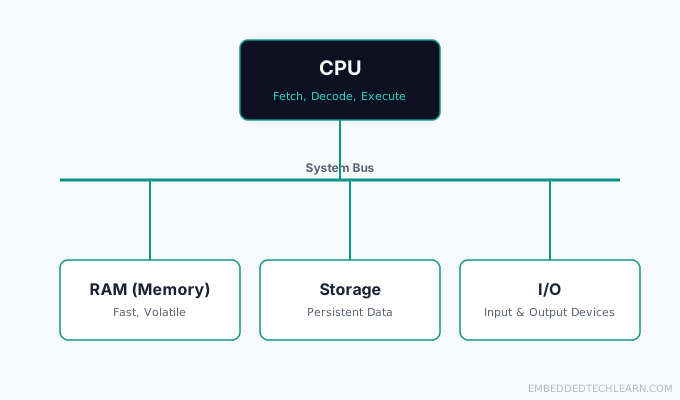
Almost every computing device, regardless of size, is built from the same four building blocks:
- CPU (Central Processing Unit): fetches, decodes, and executes instructions. It's the part actually "running" your program.
- RAM (memory): fast, volatile storage that holds the data and instructions the CPU is actively working with.
- Storage: slower, non-volatile storage (flash, SSD, or in embedded systems often on-chip flash) that keeps data when the power is off.
- I/O (input/output): everything that connects the system to the outside world: a keyboard and display on a PC, or a sensor and an LED on a microcontroller.
These four pieces are connected by a system bus: the shared pathway that carries data and addresses between them. The diagram below shows the basic shape almost every architecture builds on, whether it's a smartphone chip or an 8-bit microcontroller. For a closer look at each of these four parts on its own, see The Basic Building Blocks of a Computer.
Hardware, Software, and Where Architecture Fits
It's easy to blur these three terms together, so it's worth being precise:
- Hardware is the physical stuff: transistors, circuit boards, the actual silicon.
- Software is the instructions: the code that tells the hardware what to do, step by step.
- Architecture is the organizing layer between them: it defines how the hardware is structured so that software can actually control it in a predictable way.
A useful comparison: hardware is the appliances in a kitchen, software is the recipe, and architecture is the kitchen's layout: where the stove, fridge, and counters sit relative to each other, and how a cook (the CPU) moves between them to actually get a meal made. For a full breakdown of hardware and software, plus the third layer that sits between them, see Hardware, Software, and Firmware Explained.
Where These Models Came From
The names aren't arbitrary. Von Neumann architecture is named after John von Neumann, whose 1945 report on the EDVAC computer described a design where both program instructions and data live in the same read-write memory, a huge shift from earlier machines like ENIAC, which had to be physically rewired to run a different program. That single idea, storing the program as data instead of as wiring, is what made general-purpose, reprogrammable computing practical in the first place.
Harvard architecture takes its name from the Harvard Mark I, an early electromechanical computer that stored instructions on punched paper tape and data in separate electromechanical counters, physically separate storage for each. Decades later, when microcontroller designers needed to fetch an instruction and access data in the same clock cycle without a cache, that same separate-storage idea turned out to be exactly what they needed, and the name stuck.
Understanding this history matters for a practical reason: it explains why the trade-off exists at all. Von Neumann's design optimized for flexibility and simplicity in an era when memory itself was the scarce, expensive resource. Harvard's design optimized for the specific case where instructions and data have very different access patterns. Neither one is a strictly newer or strictly better idea, they're answers to different constraints.
How These Ideas Apply to Embedded Systems Specifically
General-purpose computers (desktops, servers, phones) run an operating system that juggles many programs, so their architecture has to stay flexible: any region of memory might hold code, data, or both, depending on what the OS scheduler decides to run next. Embedded systems are different: a single microcontroller usually runs one program, written once and rarely changed after deployment, and it needs to behave the same way every single time it runs.
This is why embedded C programming leans so heavily on understanding architecture directly, in a way that writing a desktop application usually doesn't require. When you write C for a microcontroller, you're not just calling library functions, you're often reading and writing specific memory addresses that correspond to real hardware registers, and the compiler won't stop you from getting that wrong. Later tutorials on this site (starting with memory-mapped I/O and microcontroller registers) build directly on the CPU/memory/bus model introduced here.
What Limits System Performance
Three architectural factors show up again and again when explaining why one system is faster than another:
- Clock speed and IPC (instructions per cycle): a processor's raw clock speed matters, but so does how many useful instructions it completes per tick. A chip running slower but completing more per cycle can outperform a faster-clocked one.
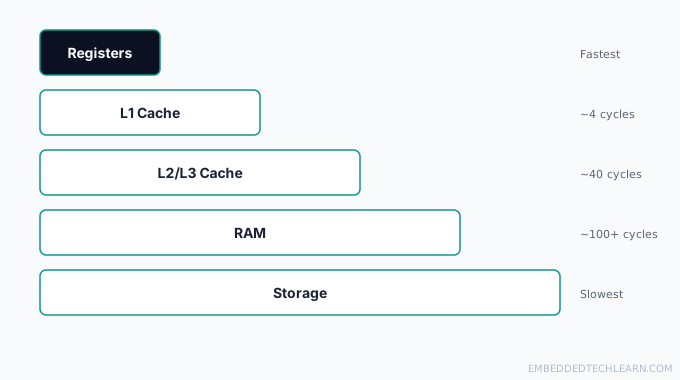
- Memory hierarchy and latency: modern CPUs can execute instructions far faster than RAM can supply data. Layered caches (L1, L2, sometimes L3) sit between the CPU and RAM specifically to reduce how often the processor has to wait. As a rough sense of scale, an L1 cache hit typically costs only a few CPU cycles, while a full trip to main RAM can cost well over a hundred cycles (see CPU Cache Memory Explained for the full L1/L2/L3 breakdown and how to actually measure it). This hierarchy sorts by speed and capacity; for the closely related question of which of these memory types survive a power cut, see RAM vs. ROM: What's the Difference?, or for the full picture including why cost per bit varies so much between tiers, see The Memory Hierarchy Explained.
- Parallelism: multi-core designs let a system execute genuinely separate instruction streams at once, rather than one CPU doing everything in sequence.
These three factors are also exactly why "just add a faster CPU" doesn't always fix a slow system: if the bottleneck is memory latency or an architecture that can't feed the CPU fast enough, a faster clock alone won't help much.
Von Neumann vs. Harvard Architecture
Almost every real system is a variation on one of two classic models: Von Neumann, which uses a single shared memory space and bus for both instructions and data (simpler, but prone to the "Von Neumann bottleneck," where the CPU has to wait for the shared bus to be free), and Harvard, which uses physically separate memory and buses for instructions and data, avoiding that bottleneck at the cost of more circuitry and less flexibility. For the full comparison, honest pros and cons of each, real chip families that use them, and a straightforward way to choose between them, see Von Neumann vs. Harvard Architecture.
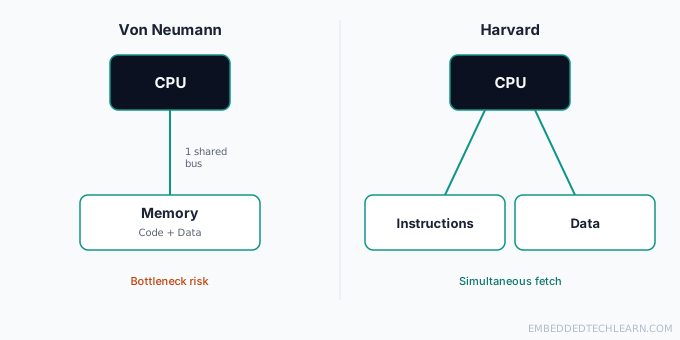
Most real microcontrollers today use a modified Harvard architecture: separate instruction and data paths internally, but with enough flexibility (often via a unified addressing scheme) to still support the software patterns general-purpose programming relies on.
Real-World Architecture Examples
Example 1: Smartphone SoC
A modern smartphone's system-on-chip combines multiple CPU cores (often split into high-performance and power-efficient clusters), a GPU, and dedicated blocks for tasks like image processing, all sharing a memory subsystem designed around strict power limits. The architecture here is optimized primarily for power efficiency, since battery life is the binding constraint, not raw throughput. This is also why a phone throttles its performance under sustained heavy load: the architecture is deliberately trading speed for staying within a thermal budget that has nowhere to dissipate heat the way a desktop tower can.
Example 2: Desktop and Server CPUs (x86)
Desktop and server processors are built around a Von Neumann-derived model, prioritizing flexibility and raw throughput. Deep cache hierarchies, aggressive out-of-order execution, and multiple cores all exist to keep a CPU that can execute billions of instructions per second actually fed with data, since raw compute capacity is worthless if the memory system can't keep up. Server variants push this further with even larger caches and more memory channels, because server workloads (databases, virtualization) tend to be far more memory-hungry than typical desktop use.
Example 3: 8-bit Microcontrollers
A microcontroller like the AVR family (used in many Arduino boards) uses a Harvard architecture: separate flash memory for program code and SRAM for data, each with its own bus. This lets the chip fetch the next instruction and read or write data in the same cycle, which matters a lot on a chip clocked at only a few megahertz with no cache to hide latency. There's no operating system scheduling other tasks in the background, so the entire chip's architecture can be built around running one program, predictably, forever.
Example 4: Gaming Console Processors
Console CPUs sit between the smartphone and desktop cases: they need sustained high throughput (for consistent frame rates) but also have real thermal and cost constraints from being sold as a fixed-price consumer device. Architecturally, this usually means a design that leans on parallelism (multiple cores, a dedicated GPU) more than on maximizing clock speed alone. Unlike a phone, a console can assume it's plugged into wall power and has real airflow, so its architecture can spend more of its power and thermal budget on sustained performance instead of battery life.
Example 5: IoT Sensor Nodes
A battery-powered IoT sensor node (say, a temperature sensor that wakes up once a minute to take a reading and transmit it) is architected almost entirely around power efficiency. It typically uses a small Harvard-architecture microcontroller with aggressive sleep modes, since the CPU spends the overwhelming majority of its life doing nothing at all, waiting for the next scheduled wake-up. A node like this might run for years on a single coin-cell battery precisely because its architecture treats "doing nothing efficiently" as a first-class design goal, not an afterthought.
Common Mistakes and Misconceptions
- Assuming architecture and hardware are the same thing. Hardware is the physical implementation; architecture is the organizational design that hardware implements.
- Assuming a higher clock speed always means a faster system. IPC, memory latency, and parallelism can matter more than raw clock speed, depending on the workload.
- Assuming Harvard architecture is strictly "better" than Von Neumann. It solves one specific bottleneck at the cost of flexibility and complexity, which is exactly why general-purpose computers still use Von Neumann-derived designs.
- Ignoring memory hierarchy when reasoning about performance. A slow program is often a memory-bound program, not a CPU-bound one.
- Treating "architecture" as a topic only relevant before a chip is designed. The same concepts (registers, memory access patterns, bus contention) directly explain runtime behavior you can observe in already-built systems, including why a specific line of embedded C code behaves the way it does.
- Assuming more cores always means better performance. Parallelism only helps if the workload can actually be split across cores; a strictly sequential task gets no benefit from extra cores and may even run slower due to coordination overhead.
Put together, the recurring theme across all of this is that architecture is about trade-offs, not a single correct answer. Every design choice covered above, shared vs. separate buses, cache size, core count, clock speed, buys one thing at the cost of another. Recognizing which trade-off a given system made is usually more useful than memorizing any single "fastest" or "best" configuration.
Frequently Asked Questions
What is the difference between computer architecture and computer organization?
Architecture describes the system from a programmer's point of view: the instruction set, memory model, and how components are meant to interact. Organization describes how that architecture is actually implemented in hardware (pipeline depth, cache size, bus width). Two chips can share the same architecture but have very different organizations.
What is the difference between architecture and hardware?
Hardware is the physical silicon and circuitry. Architecture is the design that dictates how that hardware is structured and how its parts communicate.
Why does memory hierarchy matter for speed?
Modern CPUs can process instructions far faster than RAM alone can supply data. Layered caches sit between the CPU and RAM to reduce how often the processor stalls waiting for data.
What is the Von Neumann bottleneck?
It's the performance limit that comes from instructions and data sharing a single bus in Von Neumann architecture: the CPU sometimes has to wait for one before it can fetch the other, since they can't move at the same time.
Why don't all computers use Harvard architecture if it avoids that bottleneck?
Harvard architecture needs separate memory banks and buses for instructions and data, which adds circuit complexity and cost, and it's less flexible for general-purpose systems that need to treat memory as one continuous, freely addressable space.
What is a modified Harvard architecture?
It's a practical middle ground used by most modern microcontrollers: physically separate instruction and data paths for performance, combined with enough addressing flexibility to still support general-purpose programming patterns.
Does clock speed alone determine how fast a CPU is?
No. Instructions per cycle, memory latency, and how many cores can work in parallel all affect real-world performance as much as, or more than, raw clock speed.
How does instruction pipelining improve performance?
Pipelining splits instruction execution into stages (fetch, decode, execute, and so on) so that while one instruction is being executed, the next is already being decoded, and the one after that is being fetched. This overlap increases throughput without needing a faster clock.
Is computer architecture only relevant to hardware engineers?
No. Software developers who understand memory hierarchy, cache behavior, and instruction-level parallelism can write code that runs meaningfully faster, especially in performance-sensitive or embedded contexts. Even something as simple as how a loop accesses an array in memory can perform very differently depending on whether the access pattern plays well with the cache.
Why do embedded systems favor Harvard-style architectures?
Embedded systems often need deterministic, real-time behavior on a single, dedicated task. Separate instruction and data paths make timing more predictable and let a low-clock-speed chip still keep up without a cache, which matters when the chip has to respond to a sensor or interrupt within a guaranteed, fixed amount of time.
Do I need to know computer architecture to write embedded C code?
You don't need to design a CPU, but you do need a working mental model of registers, memory addresses, and how the CPU reads and writes to hardware. Without that, concepts like volatile, memory-mapped I/O, and interrupt handling (all covered in later tutorials on this site) are difficult to reason about correctly.
What should I learn first: computer architecture or a programming language?
They're complementary, not sequential. You can learn either first, but understanding basic architecture (what memory, registers, and instructions actually are) makes concepts like pointers, performance, and low-level debugging click faster once you do start programming.
References
- Computer architecture: overview of architectural design principles.
- Von Neumann architecture: the shared-bus model used by most general-purpose computers.
- Harvard architecture: the separate-bus model used by most microcontrollers.