What You'll Learn
The CPU is the part of a computer that actually does the work, but "does the work" hides three distinct jobs happening inside one small chip. This tutorial breaks the CPU into its three internal parts (the Control Unit, the ALU, and registers), walks through the fetch-decode-execute cycle they run together millions of times a second, and shows where a CPU's limits actually come from. It's part of our Computer Architecture series, building directly on What Is Computer Architecture? and The Basic Building Blocks of a Computer.
On This Page
- What Exactly Is a CPU?
- The Control Unit: The Traffic Controller
- The ALU: The Calculator
- Registers: The Scratchpad Memory
- Why This Matters for Embedded C
- The Fetch-Decode-Execute Cycle
- CPU vs. GPU
- Real-World Examples
- Common Mistakes and Misconceptions
- Frequently Asked Questions
- References
What Exactly Is a CPU?
The CPU (central processing unit) is the primary execution engine of a computer, the part that actually carries out a program's instructions rather than just storing or moving data. At its core, a CPU does one thing on a continuous loop: fetch an instruction from memory, decode what that instruction means, and execute it. Everything a computer visibly does, from opening an app to rendering a web page, is that same loop repeating an enormous number of times per second.
A helpful comparison is a head chef running a kitchen. The chef doesn't grow the vegetables (that's storage's job) or keep every ingredient on the counter at once (that's RAM's job); the chef reads one instruction from a recipe, does that exact step, then moves to the next. A CPU works the same way, one instruction at a time, at a scale of billions of instructions per second.
Physically, a CPU is a single chip: a few centimeters of silicon covered in billions of microscopic transistors, packaged and mounted on the motherboard. Everything described in this tutorial, the Control Unit, the ALU, and the registers, exists as actual circuitry etched into that same small piece of silicon, not as separate components wired together on a board.
The Control Unit: The Traffic Controller
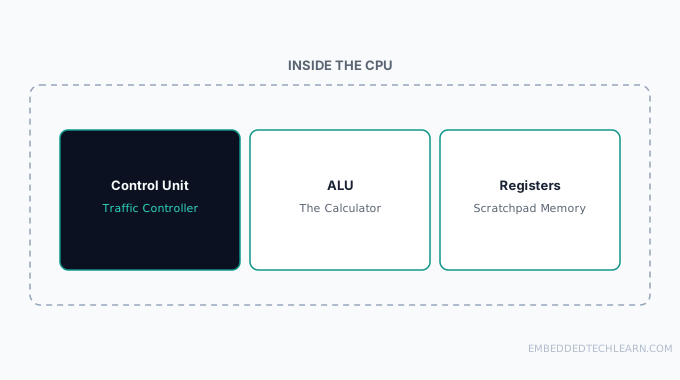
The Control Unit (CU) directs everything else inside the CPU. It fetches the next instruction from RAM, decodes it into the actual electrical signals the rest of the chip understands, and coordinates the ALU, registers, and I/O so the right operation happens at the right moment. The Control Unit doesn't do any math itself, it's purely a coordinator, closer to a traffic controller or a head chef reading out recipe steps than to the cook actually chopping vegetables.
Every instruction a program contains, no matter how complex the surrounding code looks, ultimately becomes a short sequence of decisions the Control Unit makes: which register to read from, which operation to hand the ALU, and where to send the result. None of that logic lives in software, it's built directly into the CPU's own circuitry.
The ALU: The Calculator
The Arithmetic Logic Unit (ALU) is where the actual math and logic happen. It performs arithmetic operations (addition, subtraction, and the multiplication/division built from them) and logical operations (comparing two values, evaluating AND/OR conditions). Every "if this, then that" a program executes ultimately comes down to the ALU comparing values and producing a true/false result the Control Unit acts on.
The ALU only ever works on whatever data the Control Unit hands it. It has no memory of its own and no awareness of the broader program, it takes inputs, applies one operation, and produces an output, over and over.
Modern CPUs often contain more than one ALU, or specialized variants (a separate floating-point unit for decimal math, for instance), so multiple operations can be in flight at once even within a single core. But the underlying job stays the same regardless of how many exist: take numbers in, apply one defined operation, produce a result out.
Registers: The Scratchpad Memory
Registers are tiny, extremely fast storage locations built directly onto the CPU silicon itself, not a separate chip. They hold whatever the ALU is actively working on right now, plus bookkeeping values like the address of the next instruction to fetch. There are typically only a handful to a few dozen registers, nowhere near enough to hold a whole program.
That scarcity is deliberate. A register's entire value proposition is speed, and making them bigger or more numerous would mean more silicon area and a longer physical distance for electrical signals to travel, which would slow down every single operation. This is the same trade-off What Is Computer Architecture? covers in its memory hierarchy: registers sit at the very top, fastest and smallest, with cache, RAM, and storage below getting progressively slower and larger.
Some registers have a fixed, well-known job (like holding the address of the next instruction), while others are general-purpose scratch space a compiler assigns as needed. Either way, from the programmer's side of things, registers are invisible in a high-level language, a variable in C looks like ordinary memory, but the compiler is constantly deciding, instruction by instruction, which values actually deserve a register right now versus sitting in RAM.
Why This Matters for Embedded C
Nowhere does this internal CPU model matter more directly than in embedded C programming. Writing firmware means reading datasheets that describe hardware registers, memory-mapped locations that control real physical pins and peripherals, and those are a direct extension of the same register concept covered here, just exposed to software instead of hidden inside the CPU core. Understanding that the CPU fetches, decodes, and executes one instruction at a time, using registers as its only immediate scratch space, is what makes concepts like volatile, interrupts, and memory-mapped I/O make sense later instead of feeling like arbitrary rules to memorize.
The Fetch-Decode-Execute Cycle
Everything above comes together in one repeating loop, running continuously at the CPU's clock speed (measured in GHz, billions of cycles per second):
- Fetch: The Control Unit retrieves the next instruction from RAM.
- Decode: The Control Unit translates that instruction into the specific signals needed to carry it out.
- Execute: The ALU (for math/logic) or another part of the chip performs the operation, registers hold the inputs and outputs, and the cycle restarts at the next instruction.
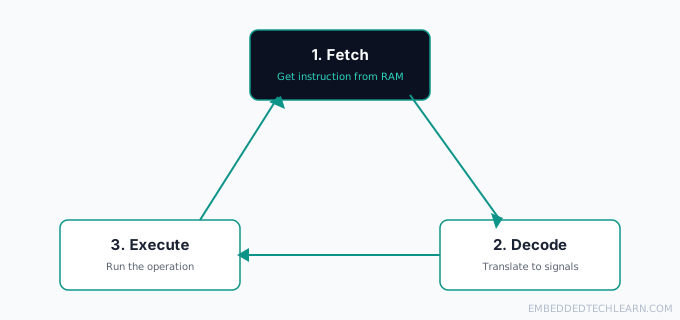
This cycle is the entire reason clock speed matters at all: each full cycle (or each pipelined stage, on more advanced CPUs) takes a fixed slice of time, and running more cycles per second means getting through more instructions per second, all else being equal.
CPU vs. GPU
A CPU is built to handle a wide variety of different tasks quickly, one after another, with just a handful of powerful cores. A GPU takes the opposite approach: thousands of much simpler cores, each doing the same narrow kind of math (the pixel and vector calculations graphics rendering needs) at the same time. A CPU is a small team of generalists switching between many different jobs; a GPU is a stadium full of specialists all doing the identical task in parallel.
This is also why a GPU can't simply replace a CPU. Most real software is a long sequence of dependent, varied steps, exactly what a CPU's flexible, sequential design is built for, and only specific, massively-parallel workloads (graphics, certain machine learning operations) actually benefit from a GPU's architecture. A modern computer typically has both for exactly this reason: the CPU runs the operating system, handles I/O, and manages the overall program flow, while the GPU is called on specifically for the narrow, parallel-friendly work it's built for.
Real-World Examples
Example 1: Adding Two Numbers in a Program
When code says c = a + b, the Control Unit fetches that instruction, decodes it into "load a and b into registers, tell the ALU to add them, store the result," the ALU performs the addition, and the result lands back in a register (and eventually RAM) for the program to use next. A single line of source code like this typically compiles down to several of these fetch-decode-execute cycles, not just one, loading each value is its own cycle before the addition itself even happens.
Example 2: An If-Statement Branch
An if (x > 10) check compiles down to the ALU comparing the register holding x against 10 and producing a true/false result. The Control Unit then decodes the next instruction differently depending on that result, jumping to one block of code or another. Every conditional in every program, no matter how the source code reads, reduces to this same ALU comparison feeding a jump decision.
Example 3: A Modern Desktop CPU
A desktop CPU with 8 cores can run 8 independent fetch-decode-execute cycles genuinely in parallel, one per core, in addition to techniques like pipelining that overlap stages within a single core. This is why heavily multi-threaded software (video editing, compiling code) benefits so much more from extra cores than a single-threaded task ever will, a task that can't be split across cores only ever uses one of them, no matter how many sit idle.
Example 4: An 8-Bit Microcontroller
A simple microcontroller runs the identical fetch-decode-execute cycle, just at a fraction of the clock speed (megahertz instead of gigahertz), with far fewer registers, and usually just one core. There's no pipelining or branch prediction to speak of, the cycle is simple and predictable, which is exactly the determinism embedded systems often need when a piece of code has to respond to a sensor within a guaranteed number of cycles.
Example 5: A CPU Under Heavy Load
When a system feels "slow," it's often not the CPU running out of raw speed, it's the CPU's registers and caches constantly waiting on slower RAM or storage to supply data (see the memory hierarchy in What Is Computer Architecture?). A CPU with nothing to fetch simply stalls, cycle after cycle, until data arrives, which is why adding a faster CPU to a memory-bound system often barely helps at all.
Common Mistakes and Misconceptions
- Treating "CPU" and "computer" as the same thing. The CPU is one chip on the motherboard, alongside RAM, storage, and everything else.
- Assuming higher clock speed always means a faster CPU. Instructions per cycle, core count, and memory latency all affect real-world speed as much as clock speed alone.
- Assuming the ALU only does arithmetic. Logical operations and comparisons run through the ALU too, they're just as central to how programs actually branch and make decisions.
- Confusing registers with cache. Registers are inside the CPU core itself and hold the immediate working values; cache is a separate, larger memory layer between registers and RAM.
Frequently Asked Questions
Is the CPU the entire computer?
No. The CPU is a single, small silicon chip seated on the motherboard, alongside RAM, storage, and everything else covered in The Basic Building Blocks of a Computer.
What is the difference between a CPU and a GPU?
A CPU handles a wide variety of tasks quickly, one after another (or across a handful of cores). A GPU contains thousands of smaller, simpler cores designed specifically for the kind of parallel math graphics rendering needs, fast at one narrow kind of work, not general-purpose.
Why are registers so small compared to RAM?
Registers prioritize speed over capacity. Making them bigger would mean more silicon area and a longer electrical path for signals to travel, which would slow every single fetch down, the opposite of what registers exist for.
What does the Control Unit actually control?
It directs the internal traffic: fetching the next instruction from RAM, decoding what it means, and coordinating the ALU, registers, and I/O so the right thing happens in the right order.
Does the ALU do anything besides arithmetic?
Yes. Alongside addition and subtraction, it handles logical operations like comparisons and AND/OR evaluations, which is what makes conditional logic (if this, then that) possible at the hardware level.
What is clock speed, exactly?
It is how many fetch-decode-execute cycles a CPU can run through per second, measured in GHz (billions of cycles per second). Higher clock speed means more cycles per second, but not necessarily more useful work per cycle, see the IPC point in What Is Computer Architecture.
Can a CPU execute more than one instruction at once?
A single core executes the fetch-decode-execute cycle sequentially, but many modern CPUs overlap stages through pipelining (fetching the next instruction while the current one is still being decoded or executed), and multi-core CPUs run separate instruction streams genuinely in parallel across cores.
What happens if the Control Unit fetches a bad instruction?
Depending on the CPU and operating system, this typically raises a fault or exception, the system either recovers by skipping or handling it in software, or the program (sometimes the whole system) crashes.
Are registers the same thing as cache?
No, though they're often confused. Registers sit directly inside the CPU core and hold the exact values being worked on right now. Cache (L1/L2/L3) is a separate, larger, slightly slower memory layer between registers and RAM. See What Is Computer Architecture for the full memory hierarchy, or CPU Cache Memory Explained for how the L1/L2/L3 levels actually work.
Why does the CPU need to decode an instruction at all?
Instructions arrive from RAM as raw binary. Decoding translates that binary pattern into the actual electrical control signals that tell the ALU, registers, and other circuits what to do, the CPU can't act on undecoded bits directly.
How does this relate to embedded systems specifically?
A microcontroller's CPU core runs the exact same fetch-decode-execute cycle described here, just smaller, slower, and simpler than a desktop CPU. Understanding this cycle is the foundation for reading embedded C code at the register level.
References
- Central processing unit: overview of CPU design and operation.
- Instruction cycle: detail on the fetch-decode-execute cycle.
- Arithmetic logic unit: overview of ALU operations.