What You'll Learn
A modern CPU can execute an instruction in a fraction of a nanosecond, but a single trip to main memory can cost hundreds of times longer. That gap is called the memory wall, and cache is the layered system of small, extremely fast memory that keeps a CPU from stalling on it constantly. This tutorial covers the L1/L2/L3 hierarchy, how a cache actually decides what to keep, the write policies that govern updates, and how to measure cache performance with real numbers. It's part of our Computer Architecture series, building on What Is Computer Architecture? and RAM vs. ROM: What's the Difference?.
On This Page
- The Memory Wall: Why Cache Exists
- The Cache Hierarchy: L1, L2, and L3
- Locality: How a Cache Decides What to Keep
- Measuring Cache Performance: Hit Rate, Miss Rate, and AMAT
- Write Policies: Write-Through, Write-Back, Write-Around
- Allocation Policies: Handling Write Misses
- Blocking vs. Non-Blocking Caches
- Why This Matters for Embedded C
- Real-World Examples
- Common Mistakes and Misconceptions
- Frequently Asked Questions
- References
The Memory Wall: Why Cache Exists
A CPU executes instructions on the scale of nanoseconds. Accessing main memory (DRAM) takes hundreds of CPU cycles by comparison, a gap so large it has its own name: the memory wall. If every single memory access paid that full DRAM cost, a CPU capable of billions of operations per second would spend almost all of its time doing nothing but waiting.
Cache closes that gap. It's a small amount of extremely fast SRAM sitting between the CPU and DRAM, built to serve the overwhelming majority of memory requests without ever touching main memory at all. Well-tuned systems serve more than 95% of requests out of cache within one or two cycles, which is what actually makes modern CPU speeds usable in practice rather than theoretical.
A useful comparison is a Formula 1 pit stop. Sending a request all the way to DRAM is like driving back to the factory for a part, technically possible, but far too slow to do on every lap. Cache is the pit crew standing right at the track with exactly the parts most likely to be needed, close enough that the car barely has to slow down.
The Cache Hierarchy: L1, L2, and L3
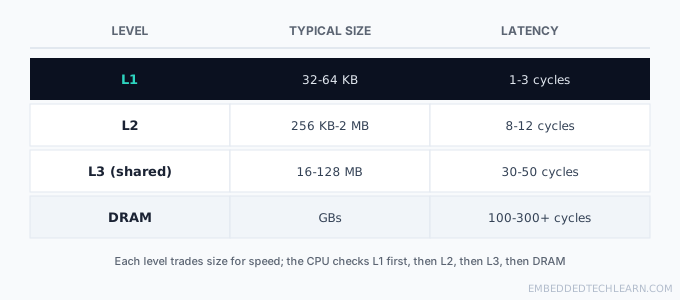
Modern CPUs use three cache levels, each trading capacity for speed differently:
- L1: smallest (32-64 KB) and fastest (1-3 cycles), private to each core, usually split into separate instruction and data caches so both can be fetched without contending with each other.
- L2: larger (256 KB-2 MB) and a little slower (8-12 cycles), typically private per core on modern chips.
- L3: largest (16-128 MB) and slowest of the three (30-50 cycles), usually shared across all cores on the chip, acting as a last stop before a request has to go all the way to DRAM.
The CPU always checks in order: L1 first, then L2, then L3, then DRAM as the last resort. Each level exists purely to catch the misses the level above it couldn't serve, which is why the hierarchy is usually drawn as a pyramid, narrow and fast at the top, wide and slow at the bottom. See What Is Computer Architecture? for how this same hierarchy extends further, down through RAM and into storage.
Locality: How a Cache Decides What to Keep
Locality is also the reason the entire multi-tier memory hierarchy, not just cache on its own, works at all, see The Memory Hierarchy Explained for how registers, cache, RAM, and storage fit together as one system built around exactly this behavior.
Cache only helps because real programs don't access memory randomly, they follow patterns. Two principles describe those patterns:
- Temporal locality: data accessed recently is likely to be accessed again soon, a loop variable read and updated on every single iteration is the classic case.
- Spatial locality: data near a just-accessed address is likely to be needed next, the following element of an array being read right after the current one.
Spatial locality is exactly why a cache miss pulls in an entire cache line, a block of adjacent bytes (commonly 64 bytes), rather than just the single byte or word the CPU actually asked for. The cache is betting that the surrounding bytes will be needed soon too, and that bet pays off often enough to be worth the extra bytes fetched on every miss.
Measuring Cache Performance: Hit Rate, Miss Rate, and AMAT
Cache performance is measured with a small set of concrete numbers, not vague impressions of "fast" or "slow":
- Hit rate (HR) = cache hits ÷ total accesses.
- Miss rate (MR) = 1 − HR = cache misses ÷ total accesses.
- Miss penalty (MP): the extra cycles needed to fetch from the next, slower level after a miss.
A well-tuned L1 cache typically sees hit rates above 95%; L2 and L3, serving the harder cases L1 already failed to catch, more commonly sit around 80-90%. These numbers combine into a single, practical measurement: Average Memory Access Time (AMAT).
For a single cache level: AMAT = Hit Time + (Miss Rate × Miss Penalty). Extended across two levels: AMAT = TL1 + MRL1 × (TL2 + MRL2 × TDRAM).
Worked example: suppose L1 hit time is 1 cycle with a 5% miss rate, L2 hit time is 10 cycles with a 20% miss rate, and a DRAM access costs 200 cycles. Working from the inside out: 0.20 × 200 = 40, then 10 + 40 = 50, then 0.05 × 50 = 2.5, and finally 1 + 2.5 = 3.5. The AMAT works out to 3.5 cycles, remarkably close to a pure L1 hit, even though 5% of accesses had to go all the way through L2 and touch DRAM 1% of the time overall. That's the entire point of the hierarchy: a fairly high miss rate at any single level barely dents the average, as long as the level below catches most of what falls through.
Write Policies: Write-Through, Write-Back, Write-Around
Reads are the simpler case (find it in cache, or fetch and store it if not). Writes are where cache design gets more interesting, since cache and main memory can end up holding different values for the same address, and something has to decide when they get reconciled.
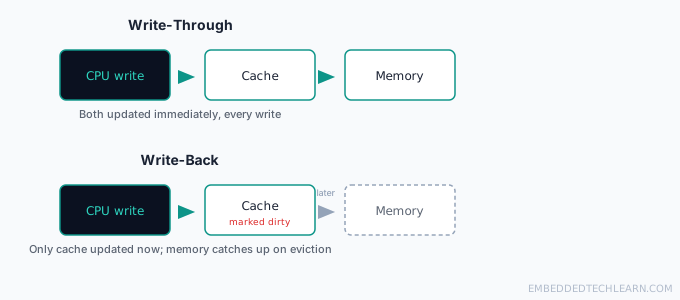
Write-through updates cache and main memory at the same time, on every write. It's simple and keeps memory always consistent with cache, at the cost of higher write latency (every write waits on DRAM) and extra memory bandwidth. This makes it a fit for systems like financial databases or RAID controllers, where a stale value in memory is a correctness problem, not just a performance one.
Write-back updates cache immediately but marks that line "dirty" and delays writing to main memory until the line is evicted later. This is far faster for write-heavy workloads (video rendering, scientific simulations) since the CPU never waits on DRAM for an ordinary write, but it does carry real risk: a dirty line lost to a power failure before it's written back is gone for good, and multi-core systems need a cache coherence protocol to make sure one core doesn't read a stale value another core's cache already updated (see Cache Coherence Explained for how that actually works).
Write-around writes straight to main memory and skips cache entirely, only pulling the data into cache later if it's actually read again. This avoids polluting cache with data that's written once and rarely re-read, a good fit for logging, where a log line is written constantly but almost never read back immediately after.
Allocation Policies: Handling Write Misses
Write policy and allocation policy answer two different questions. Write policy decides when memory gets updated; allocation policy decides what happens to cache on a write that misses:
- Write-allocate loads the missed block into cache first, then applies the write. This pays off when the same location gets written and read again soon after, a common pattern in normal program data.
- No-write-allocate writes straight to memory and skips loading the block into cache at all. Faster for one-off, isolated writes, at the cost of a guaranteed miss if that same location is read again shortly after.
In practice, the two policies tend to pair up predictably: write-back is usually paired with write-allocate (maximizing the benefit of repeated writes, the common case for a CPU's L1 data cache), while write-through is usually paired with no-write-allocate (avoiding the cost of loading data into cache that's about to be written straight through to memory anyway, a common pattern for I/O buffers).
Blocking vs. Non-Blocking Caches
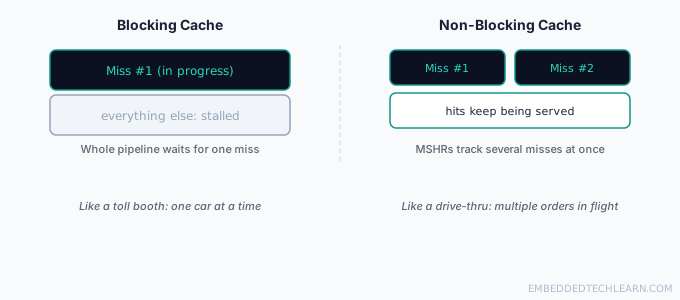
A blocking cache stalls the entire pipeline on a miss: nothing else proceeds until that one request is serviced, much like a toll booth with a single lane, one car processed at a time while everyone behind it waits.
A non-blocking cache keeps serving hits while multiple misses are still outstanding, tracked using Miss Status Handling Registers (MSHRs) that record which requests are still in flight. This behaves more like a drive-thru with several parallel order stations: a new order can be placed while earlier ones are still being prepared, instead of the whole line freezing for one slow order.
Why This Matters for Embedded C
Plenty of small microcontrollers skip cache entirely, and that's a deliberate choice, not a missing feature. Cache trades predictability for average-case speed: the exact same load instruction can take 2 cycles or 200 depending on whether it happens to hit or miss, and that variability is exactly what a hard real-time system (one that must respond to an interrupt within a guaranteed number of cycles) cannot tolerate. Where larger embedded processors do include cache, some offer cache locking, pinning specific, timing-critical code or data permanently in cache so it always behaves like a guaranteed hit, trading away part of the cache's capacity for predictability on the code that needs it most.
Real-World Examples
Example 1: A Tight Loop Over an Array
A loop that sums an array benefits from both locality principles at once: temporal locality keeps the loop counter and running total in L1 the entire time, and spatial locality means each cache-line fetch pulls in several upcoming array elements before they're even needed, so most iterations after the first hit L1 directly.
Example 2: A Multi-Core CPU Sharing L3
An 8-core desktop CPU typically gives each core its own private L1 and L2, but shares one larger L3 across all cores. This lets one core temporarily "borrow" more L3 space when it needs it and another core is idle, at the cost of contention when several cores compete for that same shared L3 simultaneously.
Example 3: A Financial Transaction System
A system posting financial transactions typically favors write-through caching. Every write must actually reach durable memory storage immediately since a crash between a cache-only write and a delayed write-back could silently lose or misstate a transaction, a risk this kind of system is built specifically to avoid.
Example 4: A Video Editing Workstation
Rendering video involves enormous, repeated writes to the same working buffers. Write-back caching lets the CPU keep working at full speed without waiting on DRAM for every single pixel write, only flushing to memory when a modified region is finally evicted from cache.
Example 5: An 8-bit Microcontroller with No Cache
A simple microcontroller reads directly from flash and SRAM with no cache layer at all. Every instruction fetch and data access takes the same, fixed number of cycles every time, slower on average than a cached CPU, but perfectly predictable, which matters far more than raw throughput for a chip that has to respond to a sensor interrupt within a guaranteed deadline.
Common Mistakes and Misconceptions
- Assuming a bigger cache is always better. Past the point where a workload's hit rate stops improving, extra cache size just adds cost, power draw, and (for shared L3) search latency with no real benefit.
- Confusing write policy with allocation policy. Write policy decides when memory gets updated; allocation policy decides whether a write miss loads data into cache at all. They're related but answer different questions.
- Assuming cache misses are rare enough to ignore. Even a "good" 95% L1 hit rate means 1 in 20 accesses misses, and those misses, not the hits, are usually what actually limits real-world performance.
- Treating cache behavior as deterministic. The same line of code can run at very different speeds depending on what ran before it and what's currently resident in cache, which is exactly why embedded systems with hard timing requirements often avoid cache altogether.
Frequently Asked Questions
What is the "memory wall"?
It's the growing gap between how fast a CPU can execute instructions and how slowly main memory (DRAM) can supply data, hundreds of cycles per access. Cache exists specifically to hide that gap so the CPU isn't stalled waiting on DRAM for the vast majority of accesses.
Why does the CPU check L1 before L2 and L3?
Because L1 is the fastest and cheapest to check. Checking in order from fastest to slowest means the common case (a hit in L1) is also the cheapest case, and the CPU only pays the cost of checking a slower level when the faster one actually misses.
What is temporal locality?
The tendency for recently accessed data to be accessed again soon, like a loop counter that's read and written every single iteration. Caches keep recently used data close by specifically to exploit this pattern.
What is spatial locality?
The tendency for data near a just-accessed address to be needed soon after, like the next element in an array. This is why caches fetch an entire cache line (a block of adjacent bytes) on a miss, not just the single byte requested.
Why not just make L1 as big as L3?
Size and speed trade off directly. A larger cache needs more circuitry to search through on every access, which adds latency. L1 stays small specifically so it can stay fast; L3 accepts more latency in exchange for holding far more data.
What does it mean for a cache to be "set-associative"?
It describes how a cache decides where a given piece of memory is allowed to be stored within it. A fully-associative cache allows any location; a set-associative cache narrows that to one of a handful of eligible slots (a 'set'), which is faster to search than fully-associative and more flexible than direct-mapped (exactly one allowed slot).
What is a "dirty" cache line?
A cache line marked as modified in write-back caching, meaning cache holds a newer value than what's currently in main memory. Dirty lines must be written back to memory before they're evicted, or the modification would be lost.
What happens to a dirty cache line if the power is cut?
The modification is lost, since it never made it to non-volatile storage or was ever going to (RAM itself is volatile too). This is why write-back caching trades a small risk window for significant write performance, and why systems that can't tolerate that risk (like some financial databases) use write-through instead.
Why do embedded microcontrollers often have no cache at all?
Cache adds unpredictability, a cache hit and a cache miss take very different amounts of time for the exact same instruction, depending on what happened to run before it. Many embedded systems need deterministic, guaranteed timing far more than they need average-case speed, so simple microcontrollers skip cache entirely and access flash/RAM directly.
Is more cache always better?
Not automatically. Beyond a certain size for a given workload, a bigger cache stops improving the hit rate meaningfully while still costing more silicon area, power, and (for a shared L3) added latency to search. Cache size is tuned to the workload it's meant to serve, not maximized blindly.
How is CPU cache different from a browser or disk cache?
The underlying idea, keep frequently or recently used data somewhere faster, is the same. CPU cache is built from SRAM directly on or near the CPU die and measured in cycles; a browser or disk cache is software-managed and measured in milliseconds, several orders of magnitude slower, but still far faster than re-fetching from the original source.
References
- CPU cache: overview of cache hierarchy, mapping, and policies.
- Locality of reference: detail on temporal and spatial locality.
- Cache replacement policies: overview of write and allocation policies.