What You'll Learn
A computer doesn't use one kind of memory, it uses at least four, each dramatically different in speed, size, and cost. This isn't an accident or a limitation engineers haven't solved yet, it's a deliberate design principle that shows up in every computer ever built, from a smartwatch to a server rack. This tutorial ties together registers, cache, RAM, and storage into one unified picture, and answers the question the other articles in this series touch on but don't fully explain: why does this exact trade-off exist, physically, at the transistor level? It's part of our Computer Architecture series, pulling together What Is Computer Architecture?, RAM vs. ROM, and CPU Cache Memory Explained.
On This Page
- One Idea, Three Trade-offs
- The Full Hierarchy, Tier by Tier
- Why Cost Per Bit Varies So Much
- How the CPU Searches the Hierarchy
- Locality: Why the Hierarchy Actually Works
- Why This Matters for Embedded C
- Real-World Examples
- Common Mistakes and Misconceptions
- Frequently Asked Questions
- References
One Idea, Three Trade-offs
Every tier of memory in a computer is a compromise between three things that fight each other: speed, capacity, and cost per bit. Make something faster and it tends to get smaller and pricier per byte. Make something bigger and cheaper and it tends to get slower. No known memory technology escapes this trade-off entirely, which is exactly why computers stack several different technologies together instead of picking just one.
This single principle is the organizing idea behind everything else in this article. Registers, cache, RAM, and storage aren't four unrelated components that happen to sit near each other, they're four points along the same speed/capacity/cost curve, each occupying the spot where its particular trade-off makes sense.
The Full Hierarchy, Tier by Tier
Putting every tier side by side makes the trade-off concrete:
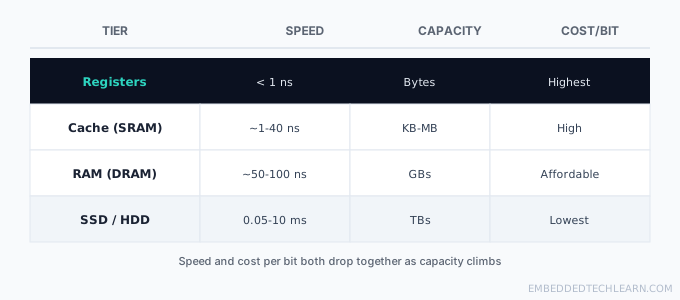
Registers, covered in What Is a CPU?, sit directly on the CPU die and hold only whatever the ALU is working with this instant. Cache (L1 through L3) is the SRAM layer covered in full in CPU Cache Memory Explained. RAM, built from DRAM, holds the operating system and every actively running program, see RAM vs. ROM for how it compares to non-volatile memory. Storage (SSD or HDD) is the slowest tier but the only one that survives a power cut and the only one large enough to hold everything a system owns, not just what it's using right now.
Why Cost Per Bit Varies So Much
The cost differences above aren't arbitrary pricing, they come directly from how many transistors it physically takes to store one bit in each technology. An SRAM cell (used in cache) needs six transistors wired together to hold a single bit reliably with no need for refreshing. A DRAM cell (used in main RAM) needs just one transistor and a capacitor, dramatically smaller and cheaper per bit, at the cost of that capacitor's charge leaking away within milliseconds unless it's actively refreshed thousands of times a second.
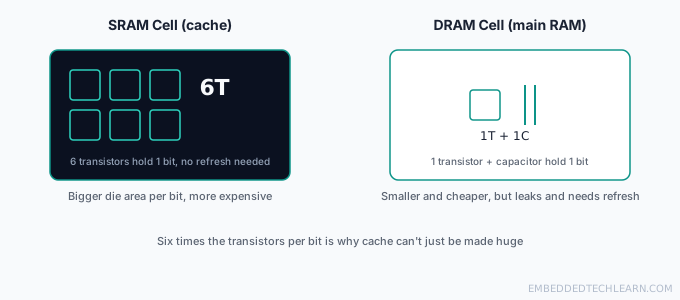
That sixfold transistor difference is the real, physical reason a chip can't simply have "more cache" without limit. Six times the transistors means roughly six times the silicon area for the same number of bits, and silicon area costs real money and draws real power. Flash memory and magnetic storage push this further still, trading away individual-bit read/write speed entirely in exchange for storing a bit using far less material per unit of capacity, which is exactly why storage capacity is measured in terabytes while cache is measured in megabytes.
How the CPU Searches the Hierarchy
Every memory access checks each tier in order, fastest first, and stops the instant it finds what it needs (a "hit"). Only a genuine miss at every faster tier above forces a trip all the way down to the next one.
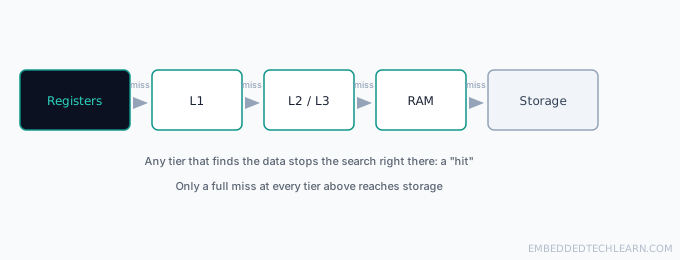
The mechanics of a cache hit and miss, including exactly how hit rate and miss penalty combine into a program's real-world average access time, are covered in full in CPU Cache Memory Explained.
Locality: Why the Hierarchy Actually Works
None of this would help if programs accessed memory randomly, a hierarchy only pays off because real programs exhibit locality of reference: they tend to reuse recently accessed data (temporal locality) and access data near what they just touched (spatial locality). CPU Cache Memory Explained covers both principles and exactly how a cache exploits them in depth, worth reading in full if this is your first time hitting the term.
Why This Matters for Embedded C
Embedded systems live this trade-off directly rather than having it abstracted away by an operating system. A microcontroller's linker script explicitly decides what lives where: constants and program code typically go to flash (slow, non-volatile, huge relative to RAM), while variables that change at runtime go to a much smaller pool of on-chip SRAM (fast, volatile, limited). On a chip with only a few kilobytes of RAM, understanding exactly where a given piece of data lives, and why, isn't an optimization detail, it's often the difference between a program that fits on the chip at all and one that doesn't.
Real-World Examples
Example 1: Why a Small Dataset "Feels" Instant
A program working with a dataset small enough to fit entirely in L2 or L3 cache can run its entire hot loop without ever touching RAM after the first pass, making it feel instantaneous compared to an equivalent program working with data too large to fit in any cache tier.
Example 2: Why RAM Upgrades Have Diminishing Returns
Adding RAM to a system that already has enough to hold its active working set does nothing for speed, the bottleneck has already moved elsewhere (the CPU, storage, or network). RAM upgrades only help a system that was actually spending time swapping to storage for lack of it.
Example 3: A High-End Gaming Desktop
A gaming desktop pairs a CPU with deep, fast cache tiers, tens of gigabytes of DRAM, and an NVMe SSD specifically so that texture and level data can move up the hierarchy fast enough to avoid stutter, each tier sized for exactly the role this article describes.
Example 4: A Battery-Powered IoT Sensor
A small microcontroller in an IoT sensor might have only a few kilobytes of SRAM and a similarly small flash chip, no cache tiers at all. The same speed/capacity/cost principle still applies, just compressed into two tiers instead of four, because the device's entire job fits comfortably within that much smaller hierarchy.
Example 5: A Database Server
A database server is tuned specifically around this hierarchy: frequently queried data (a "hot" working set) is kept resident in RAM specifically to avoid storage-tier latency, while the full dataset, far larger than RAM could ever hold affordably, lives on SSD or HDD and is paged in only when actually needed.
Common Mistakes and Misconceptions
- Assuming the hierarchy is an engineering shortcoming, not a deliberate design. No single memory technology has ever offered speed, capacity, and low cost simultaneously, the hierarchy is the correct engineering response to that fact, not a workaround for it.
- Treating "more cache" as a free performance upgrade. Larger caches cost real silicon area and power (see the transistor economics above) and can add their own search latency past a certain size.
- Assuming RAM and cache are the same thing, just different sizes. They're built from different transistor-level technology (DRAM vs. SRAM) for different reasons, not just scaled versions of one idea.
- Ignoring where storage fits in performance discussions. A "slow computer" complaint is very often a storage-tier problem (an aging HDD, a nearly-full SSD), not a CPU or RAM problem at all.
Frequently Asked Questions
Why not just make all memory as fast as registers?
Cost and physics, not just cost. Register-speed storage (SRAM) needs six transistors per bit and still can't match a register's proximity to the ALU. Building a full system's worth of memory at that speed and cost would make computers unaffordable, and past a certain size, the circuitry needed to search a larger fast memory adds its own delay anyway.
Why not just make all memory as cheap as a hard drive?
Because a CPU that had to wait milliseconds for every single memory access would run millions of times slower than modern CPUs actually do. The hierarchy exists precisely so the CPU only pays that steep cost for the data that genuinely needs bulk, cheap storage, not for data it's actively working with right now.
Is the memory hierarchy the same on every computer?
The general shape (registers, cache, RAM, storage) is universal, but the exact sizes, latencies, and number of cache levels vary a lot between a phone chip, a desktop CPU, a server processor, and a microcontroller. The principle is constant; the specific numbers are not.
Where does a GPU fit into this hierarchy?
A GPU has its own separate hierarchy, its own registers, its own cache levels, and its own high-bandwidth memory (VRAM), largely independent of the CPU's. Data has to explicitly move between the two hierarchies (over PCIe, typically), which is itself a well-known performance bottleneck in GPU-heavy workloads.
Does the memory hierarchy apply to microcontrollers too?
A simplified version does. Many microcontrollers skip cache entirely (see CPU Cache Memory Explained) but still have registers, on-chip RAM, and flash storage, the same speed/capacity/cost shape, just with fewer tiers and far smaller numbers at every level.
What is the practical effect of a program with poor locality?
It spends far more time waiting on slower tiers than a well-behaved program touching the same amount of data, since it keeps missing in cache and forcing trips to RAM or beyond. Two programs can do the identical amount of work and differ enormously in real-world speed purely based on their memory access pattern.
Why do SSDs still lag behind RAM if they have no moving parts?
Flash memory (what SSDs are built from) still has to go through a controller, an interface protocol, and cell-level read operations that are inherently slower than a direct electrical read from a DRAM cell. It closed most of the gap a mechanical hard drive had, not all of it.
Can software work around the hierarchy's limits?
Not eliminate them, but definitely respect them. Structuring code and data to maximize locality of reference (see CPU Cache Memory Explained) lets a program spend more of its time in the fast tiers of the hierarchy without needing any different hardware at all.
Can a programmer control which tier of the hierarchy their data ends up in?
Indirectly, for the most part. Standard C code can't address cache or registers directly, the compiler and CPU make those placement decisions automatically based on how the code behaves. Embedded C is the exception: a linker script can pin specific data to fast on-chip RAM deliberately, direct, explicit control over hierarchy placement that a desktop program never gets.
Why does this hierarchy matter for someone who only writes software, never hardware?
Because the hierarchy's shape explains real, observable behavior: why a program that fits in cache can run many times faster than one that doesn't, why random access patterns are slower than sequential ones, and why adding RAM helps some slowdowns but not others.
Does the memory hierarchy ever change shape as technology improves?
The number and exact sizing of tiers shifts (some server chips now add an extra cache level, or non-volatile memory tiers that sit between RAM and SSD), but the underlying principle, trading speed and cost per bit for capacity, has held for as long as computers have existed and shows no sign of going away.
References
- Memory hierarchy: overview of the speed/capacity/cost trade-off across tiers.
- Static random-access memory: detail on the six-transistor SRAM cell.
- Dynamic random-access memory: detail on the one-transistor DRAM cell and refresh requirement.